Embedding Discord Into Moodle

Prior to the Spring 2020 semester, I used to use the Piazza platform for asynchronous communication among my students. However, they have since moved to a different economic model. They used to be free, but now there is a cost to either the institution or the instructor. The other alternative is that the students are frequently reminded to contribute. On top of this annoyance, the student-contribution model lacks certain key features such as the ability to lock the platform during an exam.

Thus, starting in Spring 2020, I began to seek alternatives. My first thought was the professional communication tool Slack which I tried during the Fall 2021 semester. However, this simply did not take off. I did not get the same level of engagement that I was used to with Piazza. When I polled the students, they mentioned that “it was just one more platform to keep an eye on.”

With this feedback in mind, I wanted to find something that would integrate with Moodle, the UMass Learning Management System. The “Enhanced Moodle Forum” (then in beta) seemed to meet the need, and I tried that during Spring 2021. However, participation was still not what I expected/hoped it would be.

In both of these fall semesters, when my official efforts at a asynchronous communication platform, were falling flat, my students independently setup a Discord server. In both cases, the Discord was more active than my official platforms. Thus, for the Fall 2021 semester, I decided to try Discord. Most of my students were seemingly already on it. As I investigated further, I discovered WidgetBot (https://widgetbot.io/). This bot allows for a Discord server to be embedded within another webpage. Folks can even comment directly from the webpage without a Discord account. Discord + WidgetBot, therefore, seemed to meet all my needs: an asynchronous platform that students will actually use and can be embedded within Moodle thereby reducing the number of platforms students must check. The result, screenshot below, has been quite successful.

With widgetbot, a Discord server can be embedded within a Moodle page.

Toggerson Presenting at Perusall Exchange 2021

Starting May 17th, Brokk Toggerson will have a presentation on the 2021 Perusall Exchange about the use of Perusall in a Graduate Student TA-training & Professional Development Course.

Abstract: Graduate students face several important transitions: becoming a researcher, a teacher, and a colleague. These transitions require specific skills: reading research, giving presentations, and navigating issues of diversity in the workplace. At UMass-Amherst incoming physics Ph.D. students begin developing these skills in a dedicated seminar through the lens of TA training. Students read journal articles about physics education in Perusall: simultaneously honing students’ ability to read research articles and introducing them to teaching best-practices.

Check it out!

Conference paper on AI in answering student forum post done in collaboration with Chemistry and the College of Information Sciences Published

Zylich, Brian, Adam Viola, Brokk Toggerson, Lara Al-Hariri, and Andrew Lan. “Exploring Automated Question Answering Methods for Teaching Assistance.” In Artificial Intelligence in Education, edited by Ig Ibert Bittencourt, Mutlu Cukurova, Kasia Muldner, Rose Luckin, and Eva Millán, 610–22. Lecture Notes in Computer Science. Cham: Springer International Publishing, 2020. https://doi.org/10.1007/978-3-030-52237-7_49.

Continue reading Conference paper on AI in answering student forum post done in collaboration with Chemistry and the College of Information Sciences Published

Vevox as an interesting classroom tool

At the end of the Physics 132 course there is a lot of synthesis. The course centers around two fundamental questions: “What is an electron?” and “What is light?” Over the course of the semester, student explore these two ideas from several different directions with the goal of developing a holistic and multifaceted picture by the end of the semester. Along the way, we as a class encounter additional ideas: electric field, electric potential, and magnetic field.

Today, on the last day of class, I typically have students write everything they can think of about these two fundamental questions on small whiteboards and hold them up for me to see. Obviously, under the current circumstances, that is not possible. Enter the word cloud. Obviously, I had seen these all over the web, but I was first exposed to them in a pedagogical context through my TIDE Ambassadorship. In that experience, word clouds were presented as a nice addition to syllabi to make them more inclusive by presenting the objectives of the course in an alternative way. After adding them to my own syllabi, I got to thinking about other ways that these graphics could be used in the classroom.

Was there a way to have students construct a word cloud collaboratively that summarized the course? Vevox provides a method. In this free-to-students platform, anyone can create a word-cloud question even with the free account for up to 100 attendees. Due to the pandemic, Vevox is allowing all educators free access to a premium plan that allows up to 1500 attendees (clearly key for me!). Students simply go to http://vevox.app and enter the meeting ID. The polls integrate seamlessly with PowerPoint through a plugin. I then asked students “Define an electron! Anything you can think of is good.
Words, equations, you name it. Think across all our units.
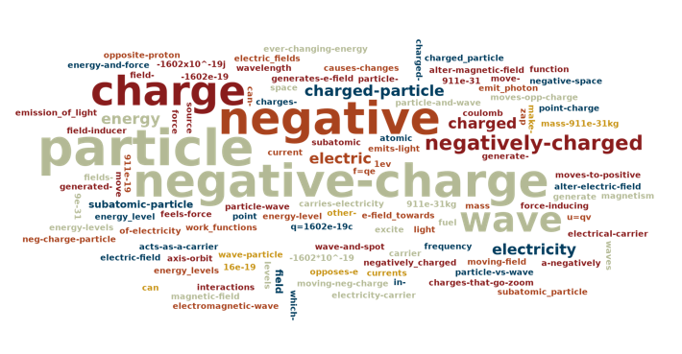
Remember to use a “-” instead of a space.” The question then opened on their devices and they were given two minutes to write as many things as they could think of. The result was the following word cloud.

The word cloud generated by my students collectively through the vevox platform.

You can see that most of the key components are there and we were able to discuss an lingering misconceptions. The students, in my view, successfully summarized the course – a much more active technique than just me doing it via lecture. This is a cool platform that actually works better for large classes! In a larger class, there is more probability that students will repeatedly say the same, correct, key points. I will almost definitely be using this more in the future.